Overview
In this article, we will review the Aline Suite Cycle, Quality Enhancement Reviews, Plans to Correct, Trip Reports, Quality Dashboard, and Aline Quality Reporting.
The Aline Suite Cycle
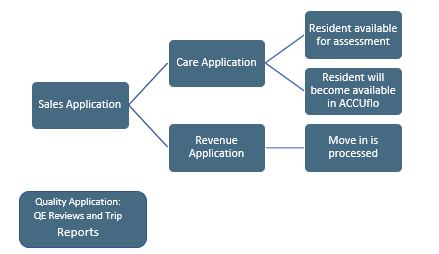
Each Aline Application works in concert with the other. See below to learn how these applications work together to seamlessly incorporate Sales, Revenue, Care, and Medication Management.
- All residents start out as sales inquiries in the Sales Application.
- Once a resident is created in Sales, the resident becomes available in Care and are ready for their initial assessment.
- Once a resident has had a room reserved in Sales, the residents are available in Revenue for lease management activities.
- Residents created in Sales will also be available in ACCUflo for medication management.
Quality Enhancement Reviews
Quality Enhancement Reviews, or QE Reviews, allow an organization’s Quality directors to survey an entire community’s operations from Resident Care to the Culinary Department, to the Business Office.
- You may have multiple surveys to choose when beginning a QE Review, so be sure you are selecting the correct one.
- All survey questions must be completely filled out before the QE Review can be submitted / PTCs are generated.
- The Scores and Progress are updated in real time on the QE Review dashboard.
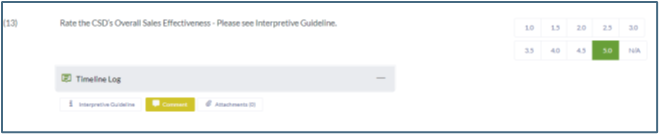
- Each survey question can contain the organization’s internal policy, or interpretive guidelines, to assist the surveyor with their scoring.
- Questions can be configured as Pass/Fail or with numerical scores such as 1 – 5.
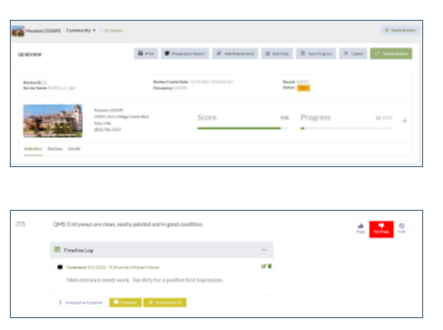
- Comments can be added to each survey question. Multiple comments can be attached to each survey question.
- Attachments such as photos or documents can also be attached to each survey question. Multiple attachments can be added to each survey question.
- Failed survey questions are configured to generate Plans to Correct, or PTCs.
Plans to Correct
Plans to Correct, or PTCs, generate automatically after completed QE Reviews or Trip Reports have been submitted. All PTCs must be resolved to finalize QE Reviews and Trip Reports. PTCs can be assigned to the community’s Executive Director along with a Due Date for PTC completion.
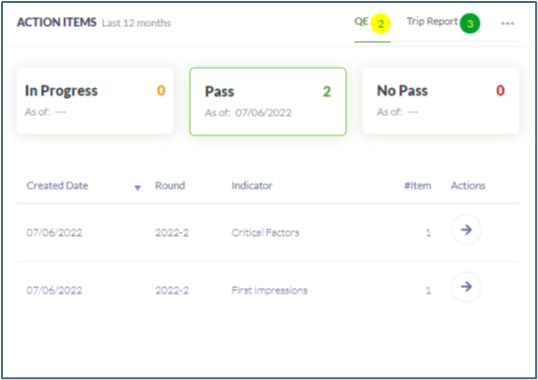
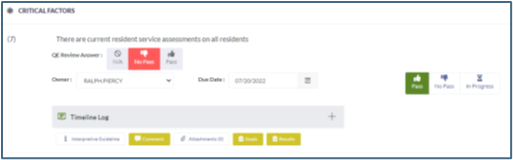
QE Reviewer comments can be entered into the Goals section. Community Executive Director or the QE Reviewer can submit results to the Results section. Ultimately, the QE Reviewer will decide whether the PTC is passed or failed.
Trip Reports
Similar to QE Reviews, Trip Reports must be selected and filled out completely before submitting to generate PTCs. Unlike QE Reviews, Trip Reports are typically narrower in focus – focusing solely on a single department, for example.
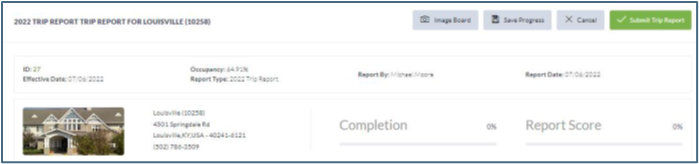 Just like QE Reviews, Trip Reports can also be configured to automatically generate Plans to Correct upon Trip Report submission.
The Quality Dashboard
The Quality Dashboard displays various helpful metrics. See the specific details displayed on the dashboard below.
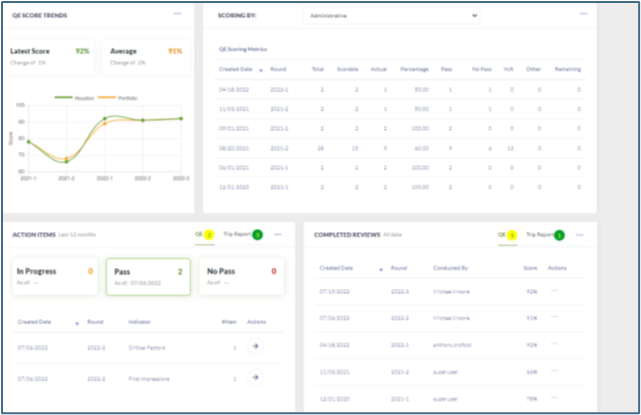
- Scoring trends for selected community + entire portfolio
- Scoring percentages by department by QE Review
- Actions Items (PTCs)
- Completed QE Review and Trip Report data
Aline Quality Reporting
Two built-in reports are available in Aline Quality: Score History and Comparative Report.
The Score History Report will display all scores for selected communities, selected departments, and selected review periods.
The Comparative Report will compare scores for selected communities, selected departments, and selected review periods.
Was this article helpful?
That’s Great!
Thank you for your feedback
Sorry! We couldn't be helpful
Thank you for your feedback
Feedback sent
We appreciate your effort and will try to fix the article