Overview
In this article, we will review build sections.
Build Sections
Step 1: You will be defaulted to Section Association, if not select. Select + button.
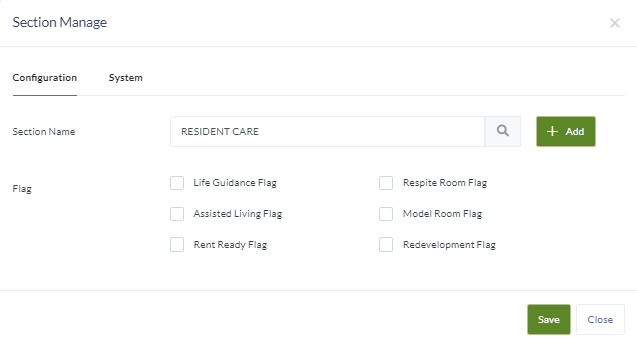
Step 2: Enter the name of the section. If the section will be for only specific groups, select the group flag. If the question is only for communities with Memory Care, select Life Guidance. If only for AL communities, then select the Assisted Living Flag etc..
Note: If a flag is selected all questions in the section will only populate on the survey for communities that apply. For example, if a community is not set up with Respite rooms in their configuration and the section has that flag selected, the questions for the section will not appear on the community’s survey/trip report. This allows groups to use one survey for communities with different set ups.
Step 3: Build all needed sections.
Was this article helpful?
That’s Great!
Thank you for your feedback
Sorry! We couldn't be helpful
Thank you for your feedback
Feedback sent
We appreciate your effort and will try to fix the article