Overview
In this article, we will review how to add questions to sections.
Add Questions to Sections
Step 1: Select from the options Question Association
Step 2: Select the + button
Step 3: Begin typing in the question you created in the question bank.
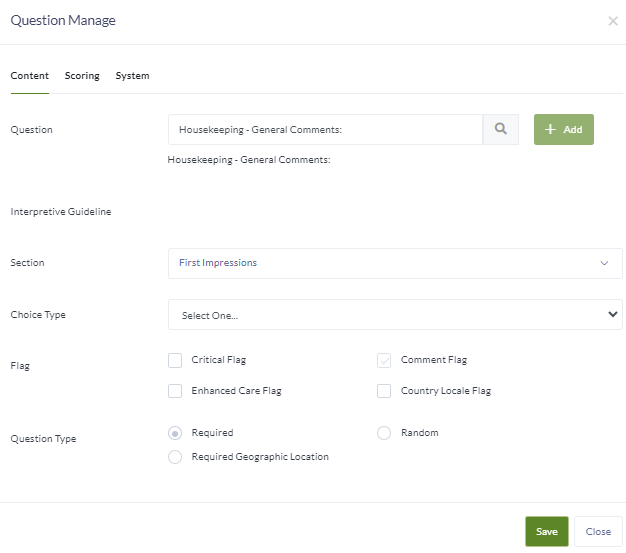
Step 4: Select any flags that apply.
Flag Types
Critical Flag – if the question has a Missed or failing score it will always trigger a Plan to Correct
Enhanced Flag – this labels the question that pertain to communities that have Enhanced Care. The question only shows up for communities that are identified with Enhanced Care.
Comment Flag – This option is defaulted on, so surveyors will have the option to add a comment for any question consistently.
Country Locale Flag – this can be selected for questions specific to an international community.
Question Type Flags
Required – Answering questions will be required to finalize a survey.
Required Geographic Location – the question is required only in a designated geographic location.
Random – this allows for the question to be randomly selected (30% random questions are recommended to utilize this feature.)
Was this article helpful?
That’s Great!
Thank you for your feedback
Sorry! We couldn't be helpful
Thank you for your feedback
Feedback sent
We appreciate your effort and will try to fix the article