Overview
In this article, we will review scoring.
Scoring
Step 1: Select the Scoring tab in the same pop up with content.
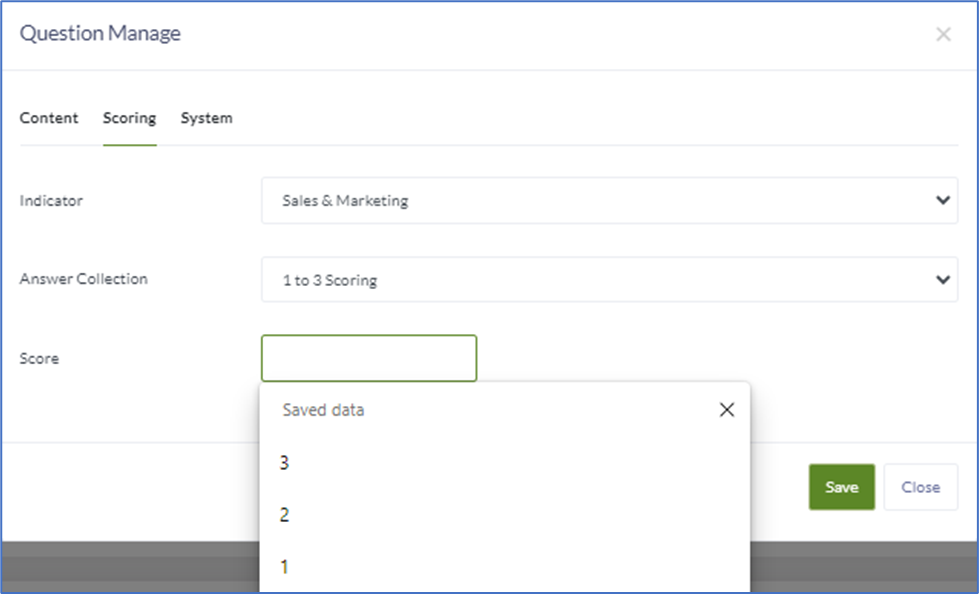
Step 2: Select from the drop down the area of responsibility, the indicator.
Step 3: Select the scoring desired for the Answer Collection
Step 4: Type in the weighted score desired.
For Example: Pass 2, Fail 1 or for scales 1-# the highest number of the scale is recommended.
Step 5: Select Save
Step 6: Put in all the questions for the survey that were created in the question bank with the scoring/answers desired.
Step 7: To check the survey or trip report run the Preview Survey by clicking on the green button on the Survey Configuration page.
Note: Reach out to your Aline Implementation Specialist for any outstanding questions if your community is still in the implementation stage. Questions can be emailed to helpdesk@alineops.com .
Was this article helpful?
That’s Great!
Thank you for your feedback
Sorry! We couldn't be helpful
Thank you for your feedback
Feedback sent
We appreciate your effort and will try to fix the article